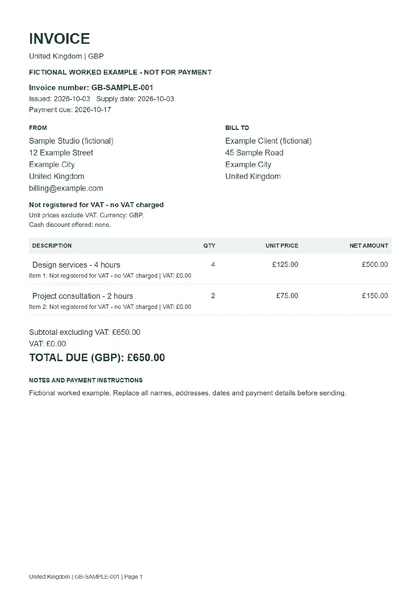
 UK invoice without VATDownload worked example (PDF) ↓
Free UK invoice template
Use this free UK invoice template to create a GBP invoice. Add your business and customer details, choose the correct VAT treatment, and download a PDF with itemised charges and VAT totals.
Create your invoice here, then download a PDF, an editable Word document or an Excel workbook.
Create your invoice ↓Before you start: For domestic invoices where every item has the same VAT treatment. Enter VAT-exclusive unit prices. Mixed VAT rates, reverse charge, margin schemes, cash discounts, credit notes and cross-border supplies are not supported.
Add your details or load a fictional example to see how the template works.
Invoice details
All amounts are in GBP. Choose the date the goods or services were supplied.
Your business and customer
Only select VAT registered if your business is registered. Use your own registration number; this tool does not verify it with HMRC.
VAT settings
Not registered for VAT - no VAT charged.
The selected treatment applies to every item. Each line and its tax are rounded to 2 decimal places, then added together. Check the correct treatment with the official guidance below.
What you are billing for
Quantities: up to 10,000 with 3 decimal places. Unit prices: up to 1,000,000 GBP. Discounts are not calculated; enter your agreed final unit prices.
Payment instructions
Your entries stay on this page and are not uploaded. Download your invoice before leaving: this tool does not save a draft.
See a completed invoice example
These examples were created with this tool using fictional details. Download a PDF to view the result, or an Excel or Word file to edit it. Any all-zero tax number is a placeholder, not a registered identity.
UK invoice without VATDownload worked example (PDF) ↓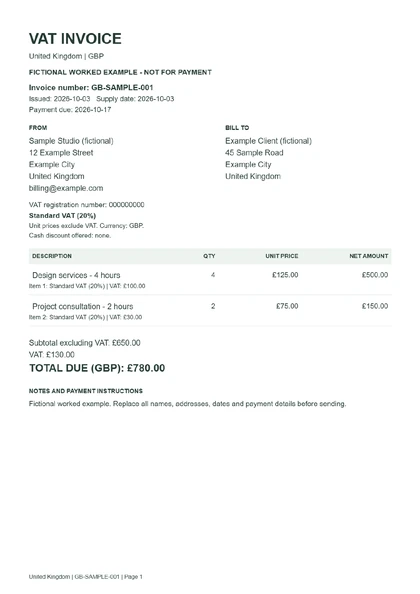 UK invoice with VATDownload worked example (PDF) ↓
How to use this UK invoice template
- Add your business, customer and invoice dates.
- Choose your VAT registration status and the treatment that applies to every item.
- Enter quantities and prices. Review the calculated tax and total.
- Add payment instructions, download your chosen format and check the finished invoice.
United Kingdom invoice details to check
Use a unique invoice number, your full legal or business name, your address and contact details, and the customer’s name and address. Sole traders should include their own name and an address where legal documents can be delivered; limited companies should use their registered company name.
The supply date and issue date are separate fields. A VAT invoice also needs your VAT registration number, item quantities, unit prices, the VAT rate, the amount before VAT and total VAT in sterling.
The standard VAT rate is 20% and the reduced rate is 5%; some supplies are zero-rated or exempt. Choose the treatment that applies to what you sell. Zero-rated and exempt are distinct options even though both add no VAT.
If you are not VAT registered, leave the registration switch off. The PDF is headed Invoice and does not charge VAT. If you are VAT registered, confirm your details and tax treatment before sending.
Official sources
This template helps prepare an invoice; it does not verify tax registration, classify your sales or submit a tax return.
Choose your invoice format
Use the download buttons below your total to save this local invoice as PDF, Word or Excel. Word lets you edit the wording and layout; recheck totals if you change amounts. Excel lets you edit item quantities and prices with formulas. For a different tax system, choose an invoice template by country or region.