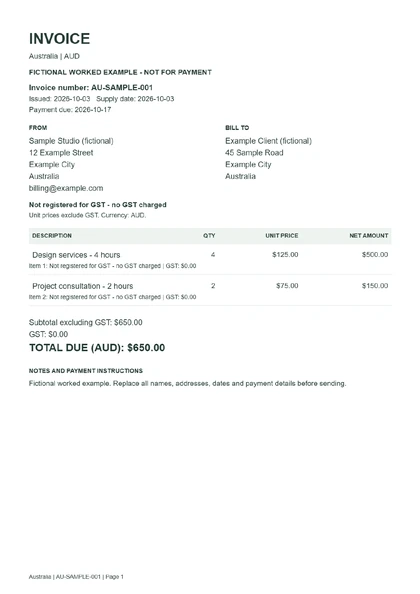
 Australian invoice without GSTDownload worked example (PDF) ↓
Free Australian invoice template
Create a free Australian invoice template in AUD. Add your ABN, select whether you are registered for GST, and calculate GST from inclusive or exclusive prices before downloading a PDF.
Create your invoice here, then download a PDF, an editable Word document or an Excel workbook.
Create your invoice ↓Before you start: For domestic invoices with one GST treatment across all items. GST-free and input-taxed sales are separate choices. Mixed supplies, recipient-created tax invoices, adjustment notes and special GST schemes are not supported.
Add your details or load a fictional example to see how the template works.
Invoice details
All amounts are in AUD. Choose the date the goods or services were supplied.
Your business and customer
Add your own ABN. GST registration is separate from having an ABN. The format check does not verify your registration with the Australian Business Register.
GST settings
Not registered for GST - no GST charged.
The selected treatment applies to every item. Each line and its tax are rounded to 2 decimal places, then added together. Check the correct treatment with the official guidance below.
What you are billing for
Quantities: up to 10,000 with 3 decimal places. Unit prices: up to 1,000,000 AUD. Discounts are not calculated; enter your agreed final unit prices.
Payment instructions
Your entries stay on this page and are not uploaded. Download your invoice before leaving: this tool does not save a draft.
See a completed invoice example
These examples were created with this tool using fictional details. Download a PDF to view the result, or an Excel or Word file to edit it. Any all-zero tax number is a placeholder, not a registered identity.
Australian invoice without GSTDownload worked example (PDF) ↓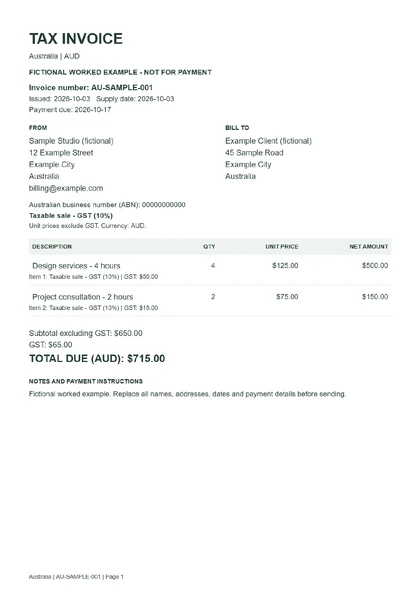 Australian invoice with GSTDownload worked example (PDF) ↓
How to use this Australia invoice template
- Add your business, customer and invoice dates.
- Choose your GST registration status and the treatment that applies to every item.
- Enter quantities and prices. Review the calculated tax and total.
- Add payment instructions, download your chosen format and check the finished invoice.
Australia invoice details to check
For a taxable sale, a tax invoice identifies the seller and ABN, issue date, what was sold, quantity and price, GST payable and the extent to which the sale is taxable. This template states the chosen treatment against every item.
For sales of A$1,000 or more, a tax invoice also needs the buyer’s identity or ABN. This editor always asks for the customer’s name and address so the buyer is identified.
GST is generally 10% for taxable sales. With GST-exclusive prices the tax is added; with GST-inclusive prices the GST component is one-eleventh of the total. This tool calculates and rounds each line, then adds the lines together.
Having an ABN does not itself mean you are registered for GST. Leave the GST switch off when you are not registered. For GST-free or input-taxed sales, select the correct treatment: both add no GST, but they are different tax categories.
Official sources
This template helps prepare an invoice; it does not verify tax registration, classify your sales or submit a tax return.
Choose your invoice format
Use the download buttons below your total to save this local invoice as PDF, Word or Excel. Word lets you edit the wording and layout; recheck totals if you change amounts. Excel lets you edit item quantities and prices with formulas. For a different tax system, choose an invoice template by country or region.